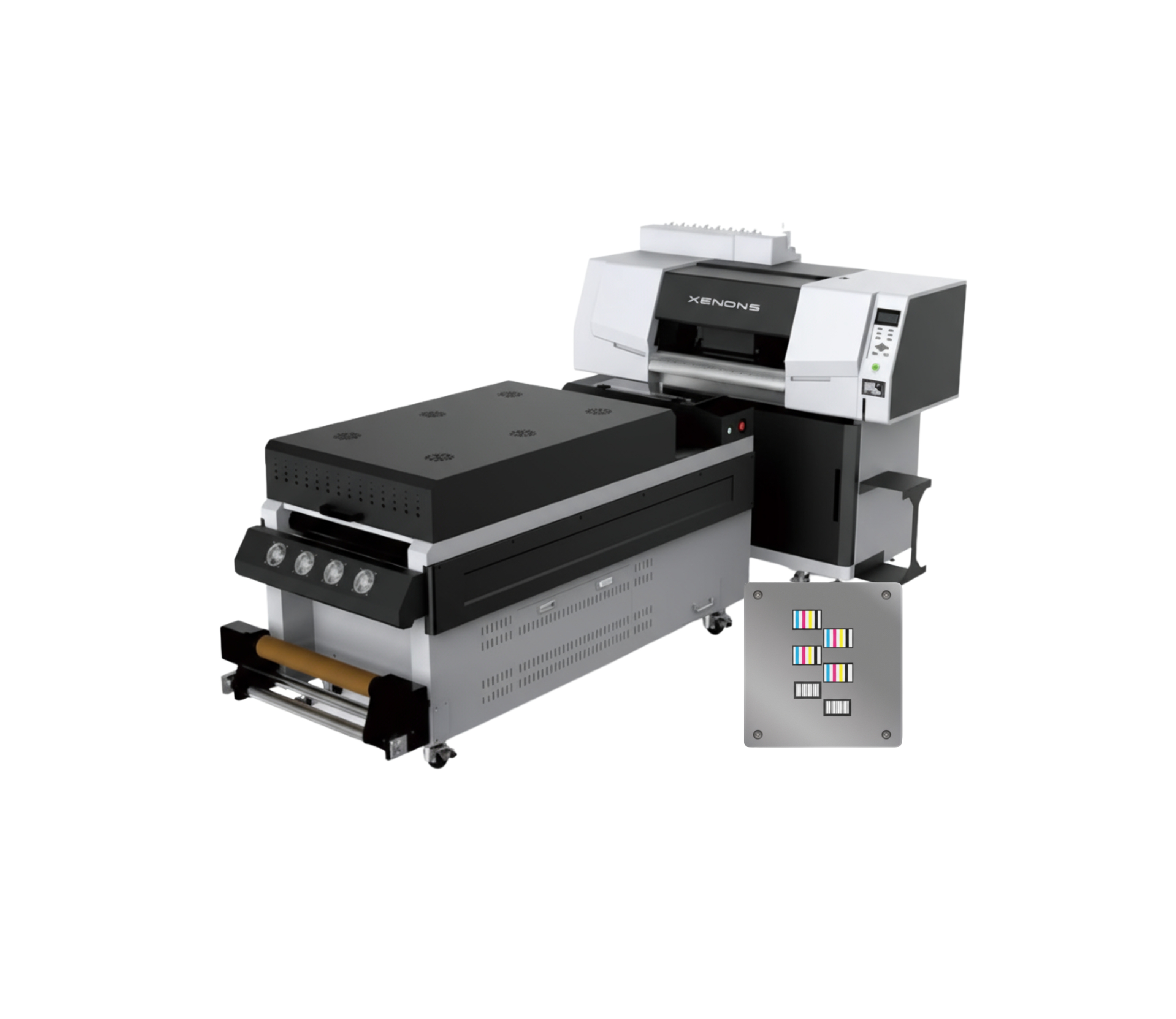
DTF 6 Printhead
Descripción
Description
Printhead: EPSON I3200*6
Printing Speed: 36 m²/h
Printing Width: 600 mm
Colors: CMYK FY FM G R OR+W+SS
Ink Type: DTF Ink
Paper: 600 mm PET Film
Media Transport: Cushioned pneumatic shaft feeding system
Suction Platform: Independent and adjustable intelligent suction system
RIP Software: Standard Photoprint and others
Interface: HI-USB3.0 / Gigabit Ethernet port
Power: AC220V, 50Hz/60Hz
Operating Environment: 15–30°C
Dimensions: 1775*960*1610 mm (L*W*H)
Textile/Rigid Material Compatibility:
100% Cotton
100% Polyester
Cotton/Polyester Blends
Lycra Elastane
Fleece – Rustic – Jersey
Sports fabrics
Dark, light, and brightly colored fabrics
Denim / Jean
TNT
Leatherette and some flexible synthetics
- High Speed 6-printhead design; maximum achievable speed is 32 m²/h.
- White-Ink Circulation System Prevents white-ink clogging and ensures more stable printing.
- Robust Body Japanese steel guide rail; integrated high-strength stand.
- Built-in Air Purifier Powder agitator with fume-purification function, electronic cleaner, and oil-fume separation.
- Intelligent Printhead Plate Heating The head heats automatically according to temperature to achieve uniform printing.
- Smart Touchscreen Easier operation thanks to the touch control panel.
Compatibility: Standard PhotoPrint and others.
Maintenance- Dust-Free Environment Keep the work environment dust-free to prevent it from affecting printing.
- Temperature and Humidity The machine should operate at a temperature of **25-30°C** and with a humidity of **40-60%**.
- Platform Cleaning Keep the entire printer tidy and clean, removing dust from friction areas.
- Cleaning the Underside of the Printhead Move the carriage to the cleaning position, clean the underside of the printhead with a **non-woven cloth dampened with cleaning fluid or distilled water**, removing dirt from the printhead and surrounding areas.
Related Products
-
3 cabezales Epson I3200Maintenance
- Daily Power On and Circulation Even if you're not printing, turn it on every day to circulate the UV ink and prevent it from hardening inside the printhead.
- Cleaning the Wiper, Cap Station, and Surrounding Area Do this daily. UV ink is thicker and crusts up quickly, clogging the nozzles.
- Avoid Direct Light on the Ink UV inks are cured by light. Keep the cartridges and the plotter area away from sunlight or external UV lights.
- Nozzle Check 1–2 Times a Day UV ink tends to dry faster. You detect any cuts before they affect a job.
- Manual printhead cleaning (only when necessary) Do this with UV cleaning solution and a lint-free cloth. Never use alcohol.
- Proper ventilation of the work area UV inks emit fumes. A well-ventilated environment improves the life of the equipment and the health of the operator.
- Cooling system maintenance Check the water in the chiller or printhead cooling system. If the cooling fails, the printhead can be damaged in minutes.
Max width: 620mmSpeed: 10 m2/hMedia: Film A (with adhesive) + B / Film A (without adhesive) + BRequest a quote -
2 Epson I3200 printheads
- Maintenance Dust-Free Environment Keep the work environment dust-free to prevent it from affecting printing.
- Temperature and Humidity The machine should operate at a temperature of 25–30°C and a humidity of 40–60%.
- Platform Cleaning Keep the entire printer tidy and clean, removing dust from friction areas.
- Cleaning the Underside of the Printhead Move the carriage to the cleaning position, clean the underside of the printhead with a non-woven cloth dampened with cleaning fluid or distilled water, removing dirt from the printhead and surrounding areas.
Max width: 600mmSpeed: 10 m2/hMedia: Pet Film 620mmRequest a quote -
3 Epson I1600 printheadsMaintenance
- Daily power-on and circulation Even if you don't print, turn it on every day so the UV ink circulates and to prevent it from hardening inside the printhead.
- Cleaning of the wiper, cap station, and surrounding areas Do this daily. UV ink is thicker and forms crusts quickly, which clogs the nozzles.
- Avoid direct light on the ink UV inks cure with light. Keep cartridges and the plotter area away from direct sunlight or external UV lights.
- Nozzle test 1–2 times per day UV ink tends to dry faster. This detects any clogs before they affect a job.
- Manual cleaning of the printhead (only when necessary) Do it with UV cleaning solution and a lint-free cloth. Never use alcohol.
- Adequate ventilation of the work area UV inks emit vapors. A ventilated environment improves equipment lifespan and operator health.
Max width: 300mmSpeed: 7 m2/hMedia: Film A (with adhesive) + BRequest a quote -
3 cabezales Epson I3200Maintenance
- Daily Cleaning of the Printhead Resting System Clean the wiper, cap station, and printhead rim every day. UV ink forms crusts that can clog nozzles if not removed promptly. Chiller (Water Cooler) Check
- X/Y/Z Axis Lubrication Apply appropriate lubricant every 1–2 weeks. Clean axes prevent vibrations and lines in the print.
- Avoid Ambient UV Light UV inks cure with light. Avoid exposing the print bed or cartridges to direct sunlight or external UV light.
- Flatbed Cleaning Keep the surface free of dust, adhesives, or material residue. Any residue can affect printhead height or damage the nozzle.
Ensure the chiller is functioning correctly.
✔️ Stable temperature (ideally 20–24°C)
✔️ Clean water and correct level
✔️ Change water every 30–45 days
Improper cooling can damage the printhead in minutes.
Vacuum System Check The vacuum should properly hold rigid parts. If suction is low, check the filters, hoses, and air intake.Max width: 600mmSpeed: 16 m2/hMedia: Glass, Acrylic, Tile / Ceramic Tile, Aluminum, iPhone Cases, Plastic, Foam Board, Wallpaper, Wall Art, Advertising Signage, Metal, Paper, Wood, MDF, Furniture, Cards, Marble, Golf Products, Gift and Promotional Items, Leather, PU, PMMA, PVC, PP, PE, PTFE, Plexiglass, Panels, Ceilings, Cardboard, Corrugated Cardboard, Chevron Panel, Fiberboard, Brick, Stone, Home Décor, Appliance Panels, Ceramic and Porcelain Tile, 3C Products, Oil Painting, Fresco, Sliding Doors, Photos, Marking and Signage, Exhibition / Trade Show Stands, etc.Request a quote