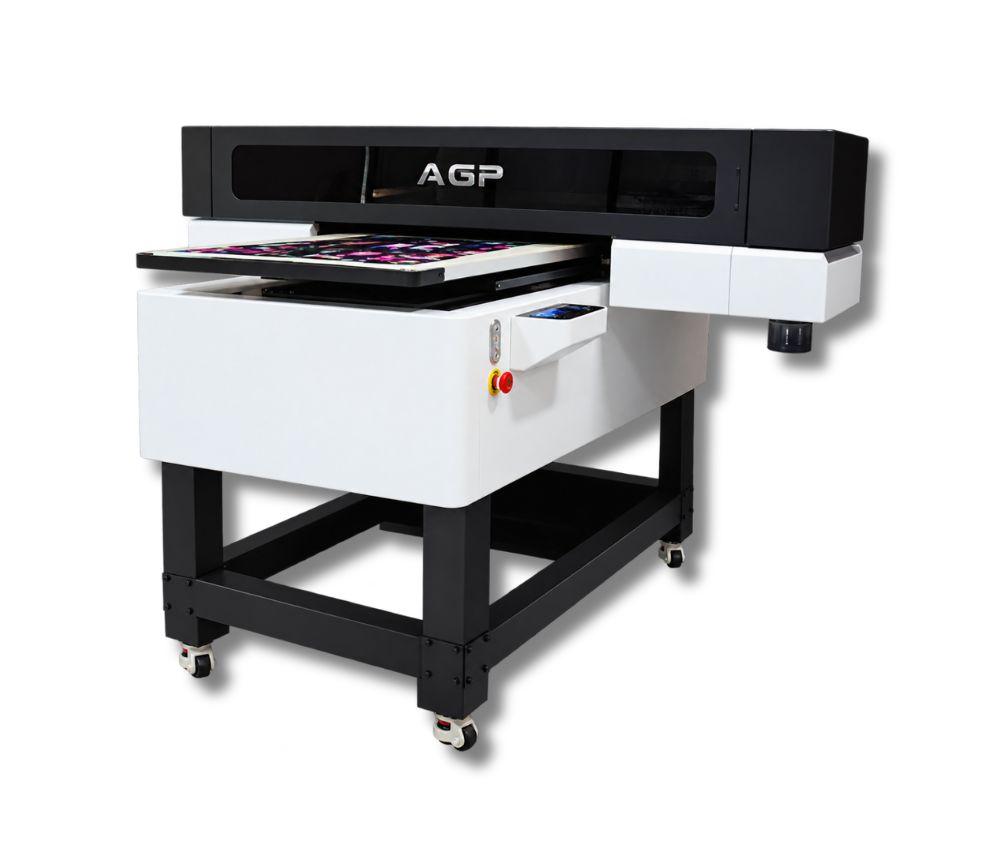
AGP UV-6090
Descripción
Description
UV flatbed printer with a maximum printing area of 600 × 900 mm, CMYK + White + Varnish configuration, and the ability to print on different rigid and flexible materials.
Maximum printing width: 600 mm
Maximum speed: 7.5 m²/h
Printheads: 3 × Epson I3200-U1
Compatible media: Glass, boards, different types of signage, crystal, PVC, acrylic, leather, plastic, among others.
Supported formats: TIFF, JPEG, PDF, EPS, PNG, AI and BMP.
RIP software: RIIN / Flexiprint / Maintop / NeoStampa
Maximum printing area: 600 × 900 mm
Maximum material thickness: 160 mm
Ink configuration: CMYK + W + V (White + Varnish)
Curing system: Air-cooled UV LED
Printing speed
Regular mode
720 × 1800 DPI – 6 PASS: 7.5 m²/h
720 × 2400 DPI – 8 PASS: 5.4 m²/h
720 × 3600 DPI – 12 PASS: 3.7 m²/h
Cylindrical printing mode
720 × 1800 DPI – 6 PASS: 5.39 min.
720 × 1800 DPI – 6 PASS: 8.31 min.
Specified diameter: 85 mm.
- IN-HOUSE DEVELOPMENT. LONG SERVICE LIFE. HIGH PRECISION. LOW COST
-
OPTIONAL CYLINDRICAL PRINTING
Allows printing on cylindrical objects from 20 to 140 mm in diameter, with a maximum width of 590 mm. -
UV LED CURING
Air-cooled UV LED system. -
CCD VISUAL POSITIONING
Optional CCD visual positioning system for the equipment. -
AUTOMATIC HEIGHT MEASUREMENT
Infrared automatic height measurement system.
- Model: UV-6090
- Type: UV Flatbed Printer
- Printheads: 3 × Epson I3200-U1
- Maximum printing area: 600 × 900 mm
- Maximum material thickness: 160 mm
- Inks: CMYK + W + V
- Curing: Air-cooled UV LED
- RIP: RIIN / Flexiprint / Maintop / NeoStampa
- Voltage: 220 V – 50/60 Hz
- Power: 400 W
- Operating temperature: 18 °C to 28 °C
- Operating humidity: 40% to 60%
- Machine dimensions: 1700 × 1545 × 1315 mm
- Machine weight: 288 kg
- Packaging dimensions: 1920 × 1660 × 1020 mm
- Shipping weight: 391 kg
- Processor: Intel Core i5-13500H or higher
- Memory: 16 GB
- Graphics card: dedicated graphics card
- Storage: 1 TB SSD
- Operating system: 64-bit Windows 10 or Windows 11
- Network: Gigabit RJ45 network card with Intel chipset + “Jumbo Packet-9014” mode for CCD camera connection.
Related Products
-
1 PrecisionCore® Micro TFP® printhead
-
INK TYPE
Epson UltraChrome DS sublimation ink (4 colors). -
MAX RESOLUTION
2400 dpi x 1200 dpi. -
DIMENSIONS (W × D × H)
970 mm × 577 mm × 245 mm. -
DISPLAY
4.3-inch touchscreen LCD. -
CONNECTIVITY
High-speed USB 3.0, Wireless LAN (802.11 b/g/n), and Wired Ethernet (1000 Base-T / 100 Base-TX / 10 Base-T).
Daily power-on (even if you don't print)
Helps the inks circulate and prevents bubbles from forming or drying out in the heads.Automatic cleaning activated
Let the equipment do its maintenance cycle. Do not interrupt it: it prolongs the life of the head.Keep the capping station, dampers, and wiper clean
These consumables accumulate ink and lint. A weekly cleaning prevents stains and clogs.Control the ambient humidity
Ideal: 45%–60%. Low humidity dries the ink; high humidity generates droplets on the paper.Check feed rollers and trays
If they are dirty, they mark the paper or generate banding.Use the equipment at least 3–4 times per week
Sublimation plotters need constant ink movement.
Max width: 620 mm (24'')Speed: 62 seconds (for A1/D size)Media: Sublimation transfer paper for textiles and rigid materialsRequest a quote -
-
4 cabezales Epson I3200Maintenance
- Dust-Free Environment Keep the work environment dust-free to prevent it from affecting printing.
- Temperature and Humidity The machine should operate at a temperature of 25–30°C and a humidity of 40–60%.
- Platform Cleaning Keep the entire printer tidy and clean, removing dust from friction areas.
- Cleaning the Underside of the Printhead Move the carriage to the cleaning position, clean the underside of the printhead with a non-woven cloth dampened with cleaning fluid or distilled water, removing dirt from the printhead and surrounding areas.
Max width: 600mmSpeed: 23 m2/hMedia: Pet Film 620mmRequest a quote -
4 cabezales Epson I3200Maintenance
- Dust-Free Environment Keep the work environment dust-free to prevent it from affecting printing.
- Temperature and Humidity The machine should operate at a temperature of 25–30°C and a humidity of 40–60%.
- Platform Cleaning Keep the entire printer tidy and clean, removing dust from friction areas.
- Cleaning the Underside of the Printhead Move the carriage to the cleaning position, clean the underside of the printhead with a non-woven cloth dampened with cleaning fluid or distilled water, removing dirt from the printhead and surrounding areas.
Max width: 600mmSpeed: 20 m2/hMedia: Pet Film 620mmRequest a quote -
3 Epson I1600 printheadsMaintenance
- Daily power-on and circulation Even if you don't print, turn it on every day so the UV ink circulates and to prevent it from hardening inside the printhead.
- Cleaning of the wiper, cap station, and surrounding areas Do this daily. UV ink is thicker and forms crusts quickly, which clogs the nozzles.
- Avoid direct light on the ink UV inks cure with light. Keep cartridges and the plotter area away from direct sunlight or external UV lights.
- Nozzle test 1–2 times per day UV ink tends to dry faster. This detects any clogs before they affect a job.
- Manual cleaning of the printhead (only when necessary) Do it with UV cleaning solution and a lint-free cloth. Never use alcohol.
- Adequate ventilation of the work area UV inks emit vapors. A ventilated environment improves equipment lifespan and operator health.
Max width: 300mmSpeed: 7 m2/hMedia: Film A (with adhesive) + BRequest a quote